Livestreaming a corporate event sounds straightforward until you’re fifteen minutes before go-live and the encoder is dropping frames. Professional livestream production for corporate events requires camera systems, a dedicated video switcher, a broadcast-quality audio mix for the stream, graphics overlays, and a bonded or dedicated internet uplink — all operated by crew who do this under pressure, every day. Get it right and your remote attendees experience the event with the same clarity as the room. Get it wrong and you’re refunding registration fees and apologizing on LinkedIn.
Key Takeaways
- A livestream is a separate production within your event — it needs its own camera ops, switcher, encoder, and audio path.
- Stream audio is not the house mix — it needs EQ and compression tuned for speakers and earbuds, not a ballroom.
- Your venue’s WiFi will fail you — professional livestream crews use bonded cellular or a dedicated hardwired uplink.
- Budget $1,500–$20,000+ for professional livestream production depending on camera count, complexity, and runtime.
- Brief your AV production company early — stream specs, platform, bit rate targets, and graphics templates all need lead time.
What’s Actually Involved in Livestream Production?
When an AV production company sets up a corporate event livestream, the technical chain runs: Cameras → Switcher → Encoder → Platform → Viewer. Every link matters. A single broken hop kills the stream for every remote attendee simultaneously.
Cameras
Most professional corporate livestreams use two to four cameras — a wide shot of the stage, a tight shot of the presenter, and optionally a cut of the slides or a panel shot. Using broadcast-grade cameras matters because they handle the low-light conditions typical of ballrooms and conference centers without hunting for focus mid-sentence. DSLRs look great in stills but struggle with auto-focus reliability and don’t offer the robust SDI output chain that a broadcast setup requires.
Video Switcher
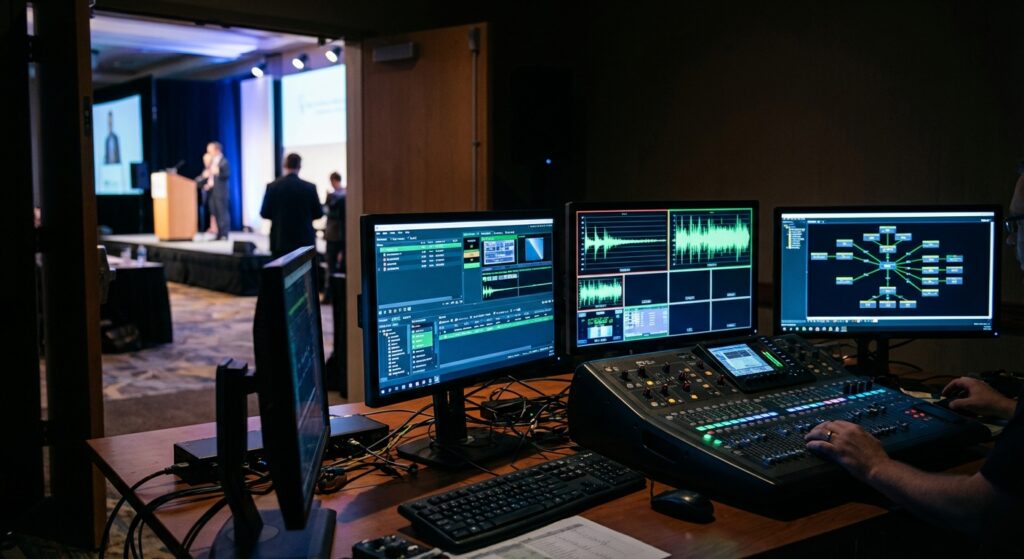
A dedicated hardware or software switcher (common platforms include Blackmagic Design ATEM, vMix, and Tricaster) lets a production operator cut between camera angles, roll pre-recorded content, and key graphic overlays — lower thirds with speaker names, sponsor logos, and event branding. This is the nerve center of the stream, and it requires a dedicated operator whose only job is the broadcast output.
Encoder
The switcher’s program output feeds a hardware encoder — a LiveU, Teradek, or a dedicated PC running streaming software — which compresses the video and pushes it to the delivery platform: YouTube Live, Zoom Webinar, Vimeo Live, or a custom RTMP endpoint. The encoder also records a local archive file simultaneously, which is essential for post-event editing and on-demand distribution.
Audio for the Stream
This is where many DIY setups fall apart. The stream cannot use the raw front-of-house (FOH) mix straight off the console. That mix is tuned for the room’s acoustics — high-end cut, room reflections compensated — and it sounds hollow and thin through consumer speakers or earbuds. A proper stream mix is a separate matrix send or IEM bus that has been re-EQ’d and compressed for speaker playback. Every presenter mic, Q&A mic, and playback audio source needs to hit that stream mix cleanly. In our experience producing corporate events, the stream audio is the element clients are least prepared to discuss in advance — and the one most responsible for poor viewer experience when it’s not planned for.
Internet Uplink
Venue WiFi is almost never sufficient for a reliable broadcast. Corporate hotel networks throttle guest bandwidth and share it across hundreds of devices. Professional livestream crews either bond multiple LTE/5G cellular connections into a single reliable pipe (using hardware like LiveU Solo or Peplink bonding routers) or coordinate with venue IT for a dedicated hardwired ethernet drop with confirmed upload bandwidth. For a 1080p30 stream at 6 Mbps encode, you need at least 12–15 Mbps committed upload with headroom for packet loss recovery.
Choosing a Streaming Platform
The right platform depends on your audience and access-control requirements. YouTube Live offers the widest reach at no cost and supports unlimited concurrent viewers — ideal for public-facing events or anything you want discoverable. Zoom Webinar and Microsoft Teams Live Events are the default for internal corporate events: attendees already have accounts, chat and Q&A are integrated, and the moderator interface is familiar. Vimeo Live offers a professional middle ground — password-protected streams, clean embedded players without platform branding, and solid analytics. For large conferences with 1,000+ concurrent remote viewers, a CDN-backed custom player on your event website gives maximum control but requires the most technical coordination.
Whichever platform you choose, brief your AV production company before the event day. Credentials, stream keys, and a full test run need to happen during the production day — not at showtime.
The Livestream Briefing: What to Tell Your AV Production Company
When you bring in an AV production company to handle your livestream, they need answers to these questions early in the planning process:
- What platform are you streaming to? — determines encoder configuration and credential handoff.
- What’s the expected concurrent viewer count? — affects encoding bitrate targets and CDN requirements.
- Do you need a recording? — confirm whether you need a local archive file or if platform cloud recording is sufficient.
- What graphics are needed? — lower thirds, bumpers, sponsor slides, countdown timers all need design lead time and must be loaded before load-in.
- Who is moderating the stream chat? — your production crew manages video and audio; someone from your team handles chat and Q&A in real time.
- What is the run-of-show? — multi-session streams with breaks and pre-recorded playback require deliberate switcher programming ahead of time.
- What’s the venue’s internet situation? — confirm whether a dedicated ethernet drop is available or whether the production company needs to bring bonded cellular.
What Does Livestream Production Cost?
A rough benchmark for professional corporate livestream production in the Portland and Pacific Northwest market:
- Basic (single camera, 1–2 hour event, stream to one platform): $1,500–$3,000
- Mid-range (two to three cameras, switcher, dedicated stream audio, graphics, 4–8 hour day): $3,500–$7,000
- Full broadcast-style (multi-cam, broadcast switcher, graphics package, redundant internet, local recording): $8,000–$20,000+
These ranges vary by crew size, equipment, and runtime. The investment is easy to justify when virtual attendance at corporate events frequently matches or exceeds in-room headcount — extending your event’s reach without adding venue, catering, or travel costs for remote participants.
Day-of Livestream Timeline
- Load-in (3–4 hours before doors): Camera positioning, cabling, switcher and encoder configuration, graphics loaded
- Full chain test (2 hours before): End-to-end stream test to the actual platform — video, audio, graphics, and internet bandwidth verified
- Tech rehearsal (1–1.5 hours before): Presenters on stage, microphones checked, slides and pre-recorded video tested through the stream chain
- Pre-show stream (30 min before program): Go live early with a holding slate and music to capture early joiners and warm up the encoder
- Program live
- Strike and archive file delivery
Common Livestream Mistakes to Avoid
Relying on venue WiFi. Enterprise hotel networks throttle mid-event when a ballroom full of attendees all pull out their phones. Bring dedicated internet. Using the house mix as the stream mix. It sounds muddy and thin through consumer speakers — always split a dedicated stream audio bus. Dead air between sessions. A blank screen during room transitions loses remote viewers fast; use a holding slate, sponsor loop, or countdown clock. Skipping the pre-event test stream. A 15-minute test to the actual platform the day before catches encoder settings, latency, and bitrate issues before they become showtime problems. Under-staffing. A two-camera livestream needs at minimum a camera operator, a switcher/encoder operator, and an audio engineer on the stream mix — combining these roles under pressure produces errors.
FAQ: Livestream Production for Corporate Events
Can we just use Zoom for the livestream?
Zoom Webinar works well for internal audiences and panel discussions. For polished public-facing events, a professional production setup — cameras, switcher, dedicated audio — fed into Zoom as an RTMP source will look significantly more professional than a laptop webcam pointed at the stage.
What internet speed does a corporate event livestream require?
For 1080p at 6–8 Mbps encode, plan for at least 15 Mbps committed upload with no other heavy users on the same circuit. Redundant bonded cellular provides a reliable backup if venue internet degrades during the event.
Do we need separate crew for in-room AV and the livestream?
For anything beyond the most basic setup, yes. Your FOH audio engineer is managing the room — the stream audio is a separate send that needs dedicated attention. Camera operators and the switcher operator are focused on the broadcast output. Splitting attention between in-room and livestream production degrades both.
Can the livestream be recorded for on-demand use?
Yes — most encoder setups record a local high-quality archive file simultaneously with the live output. This file can be edited and repurposed for on-demand streaming, social clips, or internal training materials.
How far in advance should we book livestream production?
For straightforward setups, two to four weeks is typically workable. For multi-camera builds with custom graphics packages and bonded internet coordination, six to eight weeks provides enough lead time for design, logistics, and technical rehearsals.
Ready to Produce Your Next Livestream?
If your next corporate event has a remote audience — even a small one — it deserves production that matches the in-room experience. Pro Connect Group provides full-service audio, video, and lighting production for corporate events across Portland and the Pacific Northwest, including dedicated livestream and hybrid event production services. Contact PCG to walk through your run-of-show and get a production quote that covers the full technical chain.